Certified vs. Regular Payroll: 5 Key Differences
— WH347.io Team
Stepping into federal work for the first time? Here are the five key differences between regular and certified payroll — and why confusing them can cost you a progress payment.
If you've only ever handled private construction or residential jobs, stepping into the world of federal or state-funded projects can feel like learning a new language. While 'Regular Payroll' is about paying your team, 'Certified Payroll' is about proving to the government that you paid them exactly what the law requires.
Failure to understand these differences doesn't just result in messy books — it results in rejected payments and Department of Labor audits.
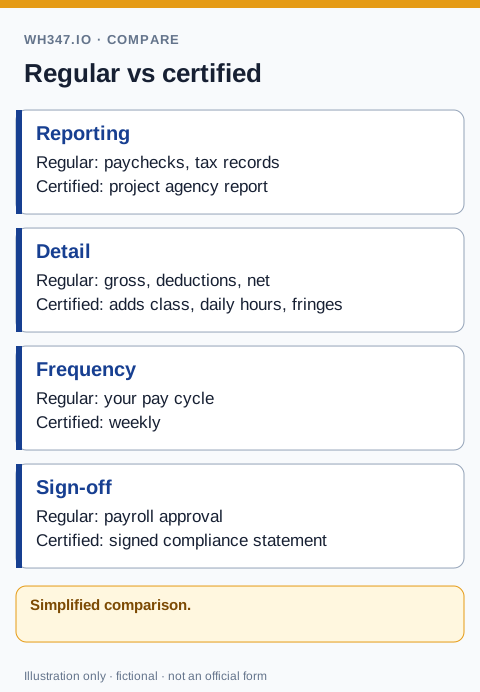
1. The 'Davis-Bacon' Wage Determination
In regular payroll, you negotiate a rate with your employee. In certified payroll, the government sets the rate.
- Regular: You pay an electrician $35/hr because that's the market rate.
- Certified: If the wage determination for that specific county says an Electrician makes $42.50 + $12.00 in fringes, you must pay that total — or you are in violation.
2. Daily Time Tracking vs. Weekly Totals
A weekly payroll total alone is not enough: certified payroll requires daily project hours and classifications. Some payroll products support this through specific reporting setups; see our edition-specific QuickBooks reporting guide and workflow comparison.
You must report exactly how many hours were worked each day (Monday–Sunday) and whether those hours were straight time or overtime. A weekly total alone is not enough.
3. The Statement of Compliance
This is the biggest legal difference. Every certified payroll report must be accompanied by a signed Statement of Compliance.
By signing it, you are testifying under penalty of perjury that the payroll is correct and that no unauthorized kickbacks or deductions were made. Regular payroll has no such sworn-statement requirement.
4. Fringe Benefit Reporting
The Copeland Act certified-payroll rule, 29 CFR 3.3, requires the weekly compliance statement and an original handwritten or legally valid electronic signature. Our signing and certification guide explains the review before signing.
In regular payroll, benefits like health insurance or 401(k) matches are usually handled behind the scenes.
In certified payroll, you must explicitly show how much of the fringe benefit was paid into a plan and how much was paid in cash to the employee. If you don't show your work, the DOL assumes you didn't pay it.
5. Submission Frequency
Regular payroll records stay in your filing cabinet or cloud drive. Certified payroll must be submitted weekly to the agency overseeing the project. If you are two weeks late, the general contractor has the right to withhold your entire progress payment.
The Bridge Between the Two
Most contractors find that their current payroll software is great at regular payroll but fails at certified payroll because it can't generate the WH-347 daily grid. Instead of keeping two sets of books or manually typing data into government PDFs, automation is the answer:
- Run your regular payroll in QuickBooks.
- Export the time data.
- Upload it to wh347.io.
- Your regular data is automatically formatted into a compliant certified payroll report in seconds.
WH347.io takes the data you already have and produces a submission-ready WH-347 PDF — no double entry, no manual grid, no compliance guesswork.
New to the requirement? Start with the plain-English certified payroll overview, then use the online WH-347 workflow when you are ready to prepare a report. Contractors who already run payroll in QuickBooks can also review the QuickBooks certified payroll comparison.
Frequently Asked Questions
What is the difference between certified payroll and regular payroll?
Regular payroll is an internal business record used to pay employees. Certified payroll is a legal compliance document submitted weekly to a government agency proving that workers on a federal project were paid the required prevailing wages. Certified payroll requires daily hour breakdowns, work classifications tied to a wage determination, fringe benefit reporting, and a signed Statement of Compliance — none of which regular payroll requires.
Can I use my regular payroll software to generate certified payroll?
It depends on the product, edition, and setup. Intuit documents certified-payroll reports for Desktop Payroll and Online Payroll Premium/Elite, with required review and completion. Check your provider's current features and the agency's required information and submission format rather than assuming a regular payroll summary is sufficient.
What is a prevailing wage and why does it matter for certified payroll?
A prevailing wage is the minimum hourly rate (base + fringe benefits) that workers in a specific trade and location must be paid on federally funded construction projects. It's set by the Department of Labor and published in a wage determination tied to each contract. Paying less than the prevailing wage is a Davis-Bacon violation reportable on every certified payroll submission.
Why does certified payroll require daily hour breakdowns?
The WH-347 form requires you to report how many straight-time and overtime hours each worker spent on the federal project each day of the week. Weekly totals alone are insufficient. This daily breakdown allows auditors to verify overtime calculations and identify whether workers may have been on multiple projects in the same week.
What happens if certified payroll is submitted late?
Late certified payroll submissions give the contracting agency — or general contractor, in the case of a subcontractor — grounds to withhold progress payments until outstanding reports are received and accepted. Chronic lateness can also trigger a DOL compliance review.