QuickBooks and Certified Payroll: What QB Does and Doesn't Handle
— WH347.io Team
QuickBooks certified-payroll features depend on the edition and payroll subscription. Compare Desktop's Excel workflow, Online Payroll Premium/Elite reporting, and an optional paystub-import workflow with WH347.io.
If you already run payroll through QuickBooks, first check your edition and payroll subscription: Intuit documents certified-payroll reporting in both Desktop Payroll and Online Payroll Premium/Elite. A paystub alone is not a certified payroll, and a generated report still needs project-specific review, completion, and a signed Statement of Compliance.
What QuickBooks Handles Well
QuickBooks Payroll does a solid job of the core payroll functions: calculating wages, withholding federal and state taxes, paying workers, generating paystubs, and producing the standard payroll reports that a CPA or tax preparer needs. For a general contractor who doesn't do federal work, QuickBooks is often all you need.
- Wage and salary calculations, including overtime.
- Federal and state tax withholding and payroll tax deposits.
- Paystub generation and direct deposit.
- W-2 preparation and filing.
- Standard payroll reports (payroll summary, employee earnings, tax liability).
Certified Payroll Features Depend on the Edition
Do not assume that every QuickBooks subscription has the same reports or that every report is ready for agency submission. Intuit's documented workflows include:
- Desktop Payroll: set up prevailing-wage payroll items, job costing, time tracking, and fringe items; generate the Certified Payroll Report through More Payroll Reports in Excel.
- Desktop requirements: a full version of Microsoft Excel, Primary Administrator access, single-user mode, and enabled macros when prompted. Intuit tags its guide for Desktop Payroll Enhanced and Assisted.
- Online Payroll Premium/Elite: set up a project, weekly pay schedule, and classification-specific straight-time and overtime pay types; use QuickBooks weekly timesheets rather than the Time app workflow.
- Online report completion: download the certified-payroll spreadsheet, review wages and deductions, add required project and worker identifiers, complete cash-in-lieu and apprentice details, and sign the Statement of Compliance.
- Agency submission: confirm the current form, receiving portal, and any XML requirements separately. These reporting guides do not prove every edition offers state XML or that an agency accepts a particular output.
Choose the workflow that fits your available reporting features and the contract. You may use Intuit's documented report workflow or an additional certified-payroll tool. Neither choice removes the need to verify the applicable wage determination, daily project hours, fringe treatment, and certification.
How WH347.io Bridges the Gap: Paystub Import
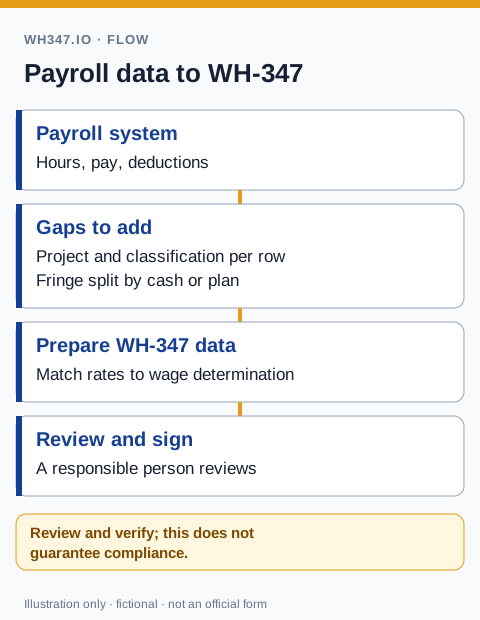
WH347.io's paystub import feature is the bridge between QuickBooks and a completed WH-347. After running payroll in QuickBooks, download the paystub PDF for each worker — QuickBooks Online generates these automatically and they are easy to export. Upload the PDF to WH347.io, and the platform uses OCR to extract the hours, wages, and deduction data directly from the paystub.
Paystub import pre-fills data for your review; extraction accuracy depends on the document and layout. Confirm project-specific daily hours, work classifications, rates, deductions, and fringe treatment against the source records. Review the generated report and complete and sign its Statement of Compliance before submission.
The Step-by-Step Workflow
- Run payroll in QuickBooks as normal — pay your workers and complete the pay period.
- Download or print the paystub PDF from the employee's paycheck view in your QuickBooks edition; navigation varies by product.
- In WH347.io, open the Timecards page, select the employee and project, and click Import from Paystub.
- Upload the QuickBooks paystub PDF. The system extracts gross wages, hours, and deductions automatically.
- Review the pre-filled timecard — correct anything that looks off, and assign the prevailing wage classification for the work performed on this project.
- Confirm fringe benefit treatment (bona fide plan contribution or cash in lieu).
- Save the timecard and generate the WH-347 PDF, eCPR XML (California), or AASHTOWare PRL XML (state DOT) from the Reports page.
The review step is not optional — which is by design. You sign the Statement of Compliance, not the software, so the final check is always yours. For a stable crew on an ongoing project, the upload-and-review process typically runs two to three minutes per worker per week.
What Data Gets Extracted from QuickBooks Paystubs
The import reads the following fields from a standard QuickBooks paystub PDF:
- Straight-time and overtime hours for the pay period.
- Hourly base rate.
- Gross pay for the period.
- Federal income tax withheld.
- Social Security and Medicare (FICA) deductions.
- State income tax withheld.
- Other deductions shown on the paystub, with their labels.
Fields the system cannot read confidently are left blank so you can fill them in. WH347.io will not guess at numbers that go into a legal compliance document.
QuickBooks Desktop vs. QuickBooks Online
When reconciling your payroll register to project reports, compare the information required for regular versus certified payroll. Edition-specific report features do not eliminate the need for project hours, classifications and certification.
Follow Intuit's Desktop Payroll certified-report instructions or its Online Payroll setup instructions and Online report review and completion steps. The Online guides are tagged for Payroll Premium and Elite, not all subscriptions. Whatever tool prepares the report, the DOL instructions control its required information.
Both QuickBooks Desktop and QuickBooks Online generate paystub PDFs, and the WH347.io paystub import works with both. Desktop users can print paystubs to PDF from the payroll reports menu. Online users download them from the employee paycheck detail view. The paystub layout differs slightly between versions, but the OCR handles both formats reliably.
For more detail on the optional paystub import feature, supported file formats, and review process, see the paystub import guide. Our QuickBooks certified payroll comparison page discusses another workflow; check the edition-specific Intuit instructions above before relying on broad product comparisons.
Frequently Asked Questions
Can QuickBooks generate a WH-347 certified payroll report?
Yes, in documented editions and subscriptions. Desktop Payroll has an Excel Certified Payroll Report workflow; Intuit also documents WH-347 spreadsheet reporting for Online Payroll Premium and Elite. Complete the required setup, review and fill missing fields, sign the Statement of Compliance, and confirm agency requirements before submission.
How do I get certified payroll data from QuickBooks into WH347.io?
Download the paystub PDF for each worker from QuickBooks after running payroll, then upload it to WH347.io using the paystub import feature. WH347.io uses OCR to extract hours, wages, and deductions from the PDF, pre-filling the timecard for your review. You assign the prevailing wage classification, review the data, and WH347.io generates the WH-347.
Does paystub import work with QuickBooks Desktop?
Yes. Both QuickBooks Desktop and QuickBooks Online generate paystub PDFs, and WH347.io's paystub import handles both. Desktop users print paystubs to PDF from the payroll reports menu; Online users download them from the employee paycheck detail view.
What data does WH347.io extract from a QuickBooks paystub?
The import extracts straight-time and overtime hours, hourly rate, gross pay, federal and state tax withholding, FICA deductions, and any other deductions shown on the paystub with their labels. Fields that cannot be read confidently are left blank for manual entry.
Is paystub import available on all WH347.io plans?
Paystub import is a Pro plan feature, available on all active Pro subscriptions with no per-import limit.