Your WH-347 Transition Checklist — 3 Weeks to Go
— WH347.io Team
Three weeks until the old WH-347 is retired. Here's a numbered action checklist — confirm your software version, notify your subs, verify pending submissions, and archive what you've already filed — so you hit October 1 with nothing left to do.
Source caution — checked October 5, 2026: The September 30/October 1 rejection deadline and March 2029 replacement-form date asserted in this historical article are not supported by the current DOL instructions. The published form is Rev. January 2025, OMB Control No. 1235-0008, expiring January 31, 2028. Use of WH-347 itself is optional; required weekly payroll information and a signed compliance statement are not. An OMB approval expiration date is not, by itself, a filing deadline. Follow the current official DOL form instructions and your contracting agency's requirements, not the deadline claims below.
Three weeks is enough time to get everything right — if you start now. After September 30, contracting agencies are required to reject WH-347 submissions on the old form. The checklist below is the complete set of actions to work through before that deadline. Check each one off and you won't be scrambling on the last day of the month.
Not familiar with what's changing? Start with the background post: New WH-347 Form: September 30, 2026 Deadline.
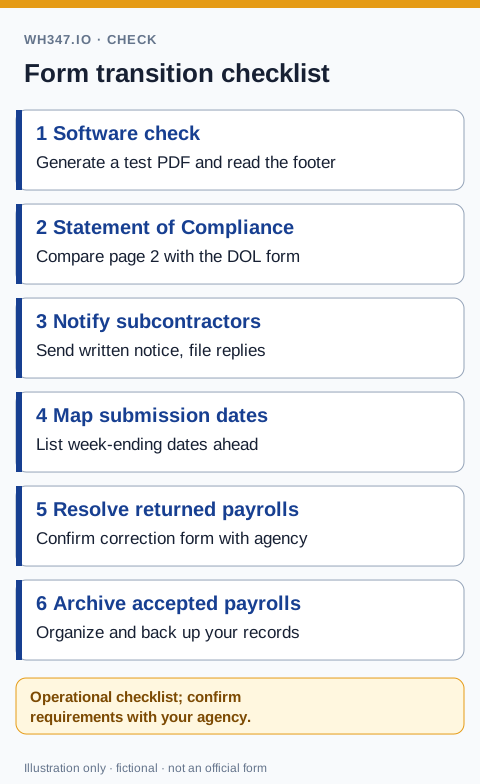
Step 1: Confirm Your Software Is on the New Form
Log into your certified payroll software and generate a test WH-347 PDF. Open it and check the form footer — specifically the OMB control number and expiration date. The new form shows: OMB No. 1235-0008, Expires March 31, 2029. If you see an expiration of September 30, 2026, your software is generating the old form and you need to contact your vendor today.
If you prepare payroll using a downloaded PDF template rather than software, download a fresh copy from dol.gov right now. Old saved copies of the form PDF are almost certainly the expired version. Bookmark the dol.gov WH-347 page directly rather than saving a local copy, so you always pull the current form.
Step 2: Check the Statement of Compliance Language
Beyond the OMB number, the most significant change on the new form is on page 2 — the Statement of Compliance. The new form's certification language has been updated to reflect the 2023 Davis-Bacon final rule, including revised fringe benefit definitions. Review page 2 of the form you're currently using and confirm it matches the current DOL version.
Step 3: Notify All Active Subcontractors
Every subcontractor on your active federal projects is independently required to switch to the new form by October 1. As prime, you have compliance exposure if a sub continues submitting on the old form — agencies may hold your progress payments while chasing a delinquent sub's corrected payrolls.
Send a written notice to every active sub this week. The message is simple: the old WH-347 form is rejected starting October 1, 2026. Confirm that their certified payroll software or form template has been updated to the new form (OMB No. 1235-0008, exp. March 31, 2029) before their next submission. Ask them to confirm in writing. Keep their responses in your project file.
Step 4: Review Upcoming Submission Dates
Map out your remaining certified payroll submission dates for September and October. Specifically:
- Which week-ending dates fall before September 30 — these can still be submitted on the old form if you haven't switched yet, but switching now is recommended.
- Which week-ending dates fall on or after October 1 — these must be on the new form. Mark your calendar.
- If you have payrolls currently in preparation for week-ending dates in late September — make sure those go out on the new form, not the old one.
- If your pay cycle is biweekly, your October payroll likely covers work in both September and October — submit weekly WH-347s regardless, and make sure October week-endings are on the new form.
Step 5: Verify Any Pending or Flagged Submissions
If you have any payrolls that were submitted but returned by the agency for correction — check whether those corrections need to be resubmitted before October 1 on the old form, or whether you should resubmit them on the new form. In most cases, resubmitting pending corrections on the new form is the cleaner approach even if they were originally submitted on the old one.
Step 6: Archive Accepted Old-Form Submissions
Keep both original and corrected reports using the certified-payroll retention checklist. 29 CFR 5.5(a)(3) requires payroll records to be preserved for at least three years after all work on the prime contract is completed; our audit preparation guide explains how to organize the supporting records.
Old-form payrolls that have already been accepted by contracting agencies do not need to be resubmitted. But they do need to be retained. Make sure your archived WH-347 records — whether digital or paper — are organized and will remain accessible for the full three-year retention period from project completion.
If your certified payroll software stores these records, export or back them up now. Don't assume access to a software subscription guarantees record preservation three years from now.
WH347.io Users
WH347.io generates WH-347 PDFs using the current DOL form — no action required from existing users. Your reports are already on the new form. You can verify by checking the OMB number in any recently generated PDF. All historical records are stored in your account and are always retrievable.
Not yet using WH347.io? Start free — the Starter plan generates fully compliant WH-347 PDFs with no subscription required.
Frequently Asked Questions
How do I verify my WH-347 software is using the new form?
Generate a test WH-347 PDF and check the form footer. The new form shows OMB No. 1235-0008 with an expiration date of March 31, 2029. If the expiration date is September 30, 2026, your software is generating the old form and you need to contact your vendor to request an update.
Do I need to retroactively resubmit payrolls already accepted on the old form?
No. Payrolls already accepted by contracting agencies on the old form do not need to be resubmitted. The deadline applies only to submissions made on or after October 1, 2026. Retain accepted old-form records for the three-year retention period from project completion.
What should I tell my subcontractors about the deadline?
Send written notice this week: the old WH-347 is rejected starting October 1, 2026. Ask each sub to confirm their software or form template has been updated to the new form (OMB No. 1235-0008, exp. March 31, 2029) before their next submission. Keep their written confirmations in your project file.
What if I have a biweekly pay cycle — how does that affect my WH-347 deadlines?
WH-347 submissions are weekly regardless of your pay cycle. If your pay period covers multiple work weeks, you submit one WH-347 per work week. Any WH-347 covering a work week ending October 1 or later must be on the new form.
Should I correct pending submissions using the old form or the new form?
Use the new form. Even if the original submission was on the old form and is being corrected before October 1, submitting the correction on the new form is the cleaner approach and avoids any issue if the correction happens to be processed after the deadline.