How to Tell If You're Using the New WH-347 Form (4 Weeks Left)
— WH347.io Team
September 30 is four weeks away. The new and old WH-347 forms look almost identical — but three specific markers tell you which version you're on. Here's exactly where to look and what you'll see.
Source caution — checked October 5, 2026: The September 30/October 1 rejection deadline and March 2029 replacement-form date asserted in this historical article are not supported by the current DOL instructions. The published form is Rev. January 2025, OMB Control No. 1235-0008, expiring January 31, 2028. Use of WH-347 itself is optional; required weekly payroll information and a signed compliance statement are not. An OMB approval expiration date is not, by itself, a filing deadline. Follow the current official DOL form instructions and your contracting agency's requirements, not the deadline claims below.
Four weeks from today is September 30, 2026 — the last day contracting agencies can accept the old WH-347 form. Starting October 1, any submission on the old form must be rejected. The problem most contractors face right now is not that they don't know about the deadline. It's that they can't tell which form they're actually using.
The new and old WH-347 forms look nearly identical at a glance. The same columns, the same Statement of Compliance structure, the same two-page layout. But there are three specific markers that distinguish them, and once you know where to look, verification takes ten seconds.
For the full background on why the form was updated, see: New WH-347 Form: September 30, 2026 Deadline.
Marker 1: The OMB Control Number
Both the old and new WH-347 carry OMB No. 1235-0008 — the control number has not changed. So the OMB number alone is not a distinguishing factor. What distinguishes them is the expiration date next to that number.
Marker 2: The Expiration Date in the Form Footer
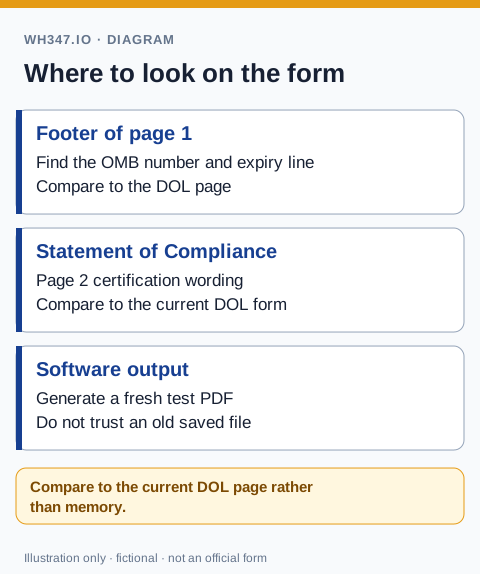
Look at the bottom of page 1 of your WH-347 form. You'll find a line that shows the OMB approval number and an expiration date. This is the fastest and most reliable way to confirm which version you're using:
- Old form: OMB No. 1235-0008, Expires 09/30/2026 — this is the form being retired. Do not use after September 30.
- New form: OMB No. 1235-0008, Expires 03/31/2029 — this is the current, compliant form. This is what you need to be generating.
If you use certified payroll software, generate a test WH-347 PDF right now and check the footer. If you see September 30, 2026 — contact your vendor today. Four weeks is enough time to update, but only if you start now.
Marker 3: The Statement of Compliance Language
Use the DOL's current form and instructions, not the dates in an old article, as your version reference. Our fillable-form version check identifies the current markers, and the field-by-field instructions explain the revised payroll and certification fields.
The most substantive difference between the two forms is on page 2 — the Statement of Compliance. The new form revised the certification language to align with the 2023 Davis-Bacon final rule. The changes affect how fringe benefits are described in the certification and the definitions referenced in the compliance statement.
To check this marker: compare the text of paragraph 4 in the Statement of Compliance on your current form against the current version posted at dol.gov. If the language differs from what's posted there, you're on the old form.
Where These Markers Appear in Practice
Depending on how you prepare certified payroll, check these markers in different places:
- If you use certified payroll software: generate any WH-347 PDF and check the footer of page 1. The software controls the form template — it is either generating the new form or the old one. You cannot manually override it.
- If you fill out a downloaded PDF from dol.gov: the expiration date is on the form itself. If you downloaded the form more than a few months ago, there is a good chance it's the old version. Download a fresh copy from dol.gov today.
- If you use a paper form: same as the PDF — check the footer. If you have old-form stock printed or stored, set it aside and use only the new form going forward.
- If your agency uses a portal (AASHTOWare, eCPR): the portal generates its own output. Contact the portal administrator or check the system's release notes to confirm they have updated to the new form's data requirements.
What If You've Been Using the Old Form?
Payrolls submitted on the old form before October 1 and accepted by the contracting agency are fine — you don't need to resubmit them. The deadline is prospective, not retroactive. What you need to do is make sure the next submission goes out on the new form.
If your software needs to be updated, contact your vendor this week. If you're using a downloaded template, replace it now. If you're using a paper form, discard old-version stock. Four weeks is the right amount of time to make the switch cleanly — without rushing on September 29.
WH347.io: Already on the New Form
WH347.io updated its WH-347 PDF template when the new form was released. Every PDF generated by WH347.io today shows OMB No. 1235-0008, Expires 03/31/2029 in the footer and uses the updated Statement of Compliance language. Existing users can verify this on any recently generated report — no action required.
If you're currently using a different tool or a downloaded PDF template, try WH347.io free — the Starter plan generates fully compliant WH-347 PDFs with no setup required.
Frequently Asked Questions
How do I tell if I'm using the new WH-347 form or the old one?
Check the footer of page 1 of your WH-347 form. The new form shows OMB No. 1235-0008, Expires 03/31/2029. The old (retiring) form shows the same OMB number but with expiration 09/30/2026. Also compare the Statement of Compliance language on page 2 against the current version at dol.gov — the new form has updated certification text reflecting the 2023 Davis-Bacon final rule.
What OMB number is on the new WH-347 form?
OMB No. 1235-0008 — the same number as the old form. The OMB number has not changed; what changed is the expiration date. The new form expires March 31, 2029. The old form expires September 30, 2026.
How do I verify that my certified payroll software is using the new form?
Generate any WH-347 PDF from your software and check the footer of page 1. If it shows an expiration of March 31, 2029, you are on the new form. If it shows September 30, 2026, your software is still generating the old form — contact your vendor immediately and request the update.
Do I need to resubmit payrolls that were accepted on the old form?
No. Payrolls already accepted by contracting agencies on the old form before October 1 do not need to be resubmitted. The deadline is prospective — it applies only to submissions made on or after October 1, 2026.
Where can I download the current WH-347 form?
The current WH-347 form is available at dol.gov (search 'WH-347'). Always download a fresh copy rather than using a locally saved version — old bookmarks often point to the expired form. The new form shows an expiration of March 31, 2029 in the footer.