AASHTOWare Certified Payroll XML: State DOT Guide
— WH347.io Team
For contracts whose agencies use AASHTOWare Project, confirm the accepted schema, identifiers, and submission method before uploading payroll. Learn the XML workflow and how to review a WH347.io export.
Some transportation agencies use AASHTOWare Project Civil Rights & Labor Management to collect certified payroll. The official resource kit supports manual entry as well as Payroll XML import. A DOT contract or a non-California location does not by itself establish that AASHTOWare is the required system.
WH347.io offers an AASHTOWare-targeted Payroll XML export. This guide explains the workflow and checks to perform before using it. An export option or version label is not proof of receiving-agency compatibility or acceptance.
What Is AASHTOWare Project?
AASHTOWare Project is an AASHTO software suite for transportation project administration. Agencies using its Civil Rights & Labor Management component can collect and review certified payroll. The receiving agency determines whether your contract uses that component and how contractors enter, import, certify, and submit payroll.
Federal-aid highway work may be subject to Davis-Bacon Related Acts requirements, while state prevailing-wage rules may also apply. Coverage and submission format are separate questions: check the funding program, contract clauses, agency portal instructions, and accepted XML schema rather than assuming every DOT uses the same system.
Which States Use AASHTOWare for Certified Payroll?
Agency documentation, not a national software list, should establish the workflow for your contract. Minnesota provides a documented example; it is not proof of adoption or identical requirements in every state:
- Minnesota's contractor guide describes direct entry, an Excel-to-XML conversion workflow, and import of XML generated by payroll software.
- Confirm whether your own agency uses the Civil Rights & Labor component for this contract, not merely another AASHTOWare product.
- Obtain the agency's accepted schema, vendor and contract identifiers, certification steps, and any additional submission requirements.
California DIR has a separate eCPR reporting workflow; that does not establish what every California awarding agency uses or what all other states require. WH347.io offers CA eCPR and AASHTOWare-targeted exports, but select a format based on the receiving agency's instructions, not just the state.
Which Payroll XML Schema Does the Agency Accept?
Use the official Payroll XML Resource Kit and its published schemas. The kit identifies itself as version 2.2, while the main PRL XSD declares version 1.2 and the prl/1.2 namespace. These are different version identifiers, neither of which proves every agency accepts a particular software export. MnDOT's contractor guide documents manual entry and XML alternatives. Compare California's separate eCPR workflow and the federal data fields, then confirm your agency's requirements.
Payroll XML represents structured contractor, contract, payroll-period, employee, work, wage, deduction, and fringe information. The receiving system's schema defines the allowed elements and structure. Do not treat a product's 'PRL 1.2' label as the current universal standard; compare the actual file with the agency's required schema and validation rules.
Confirm the agency's contract and vendor identifiers, worker identifiers, craft codes, dates, hours, wages, deductions, and fringe settings. Required fields and element ordering come from the applicable XSD and agency instructions. Passing schema validation checks structure, not whether wages were correct or the agency will accept the report.
How WH347.io Generates the XML
WH347.io assembles its AASHTOWare-targeted XML from project, employee, classification, timecard, and fringe data. Review the downloaded file against the receiving agency's schema and identifier requirements before upload. The generated filename is a product convention, not a universal DOT requirement.
- Craft codes come from your work classifications, which you assign per project.
- Fringe benefit payment type (BENE / CASH / BOTH) is set on the project and applied to all employees in that export.
- Employee gender (M/F/N) and ethnicity are stored on each employee record for civil rights reporting.
- Set the agency-assigned Vendor ID on the project. If an export falls back to the organization's FEIN, do not assume that fallback matches the agency's identifier; verify before uploading.
- Hours are broken down by day (Monday–Sunday) in both straight-time and overtime, matching the PRL schema.
How to Set Up an AASHTOWare Project in WH347.io
- Confirm that the agency accepts the export for your contract before selecting the AASHTOWare jurisdiction. A non-California state or an app default does not prove adoption.
- Enter the federal contract number, AASHTOWare Vendor ID, and fringe benefit payment type (BENE, CASH, or BOTH) on the project.
- Add your employees with gender and ethnicity filled in — these are required for civil rights reporting in the XML.
- Assign work classifications to the project and set craft codes to match your state DOT's classification codes.
- Enter weekly timecards for each employee.
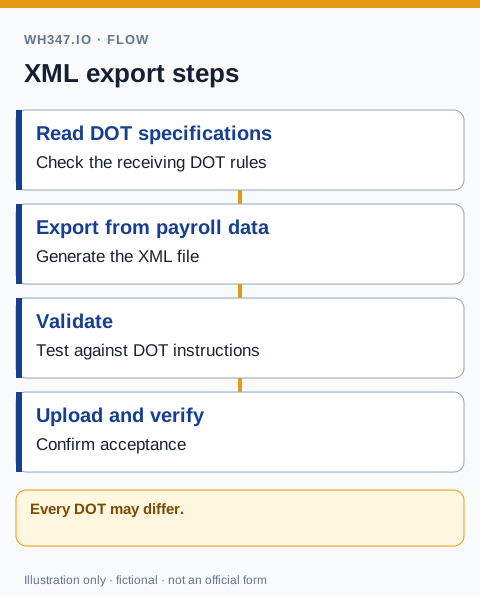
- Download Payroll XML from the Timecards page for the relevant pay period; validate it against agency requirements, then complete the portal's review, certification, and submission steps.
Common Submission Pitfalls
- Wrong craft code — state DOTs maintain their own classification code tables. A generic description like 'Laborer' may not match the code your state expects. Verify craft codes with your DOT project engineer before submitting.
- Missing AASHTOWare Vendor ID — this is different from your FEIN. It's the ID your DOT has assigned to your company in their AASHTOWare system. Contact your state DOT to confirm it.
- Incorrect fringe payment type — 'BENE' means all fringe is paid into a bona fide plan, 'CASH' means all fringe is paid as a cash wage supplement, and 'BOTH' means a combination. Selecting the wrong one causes compliance issues even if wage math is correct.
- Schema mismatch or ordering errors — validate against the receiving agency's required XSD, not an assumed universal PRL version.
- Submitting for the wrong project — each XML file is tied to a specific contract ID. Double-check the contract number on the project before exporting.
- Late submissions — confirm the receiving agency's actual weekly reporting deadline and workflow rather than assuming every DOT uses the same seven-day rule.
AASHTOWare vs. WH-347 PDF
Where the agency permits Payroll XML import, it can reduce re-entry, but upload may be only one step before review and certification. Some agencies also support manual entry or require other copies for the prime or awarding body. Do not assume XML always replaces PDF or that both are always required; follow the contract's submission instructions.
Getting Started
AASHTOWare-targeted XML export is available on the WH347.io Pro plan for projects using that jurisdiction. Before relying on it, obtain agency instructions, verify identifiers and schema compatibility, and review the report. A downloadable export is not a guarantee of successful import or accepted certification.
Frequently Asked Questions
What is AASHTOWare and why does it matter for certified payroll?
AASHTOWare Project includes a Civil Rights & Labor Management component that participating agencies can use for certified payroll. Manual entry and XML import are supported by the official resource kit. Your agency and contract determine whether to use it and how to submit and certify payroll.
Which states use AASHTOWare for certified payroll submissions?
Minnesota's official contractor guide documents AASHTOWare CRL payroll entry and XML import. This guide does not establish a nationwide adoption list. Confirm your own agency's current contract instructions; a state location alone does not prove which system or format is required.
Does every AASHTOWare agency accept PRL 1.2 XML?
Do not assume universal acceptance. Resource Kit 2.2 publishes PRL-GML20170101pxs.xsd, which declares schema version 1.2 and a prl/1.2 namespace; the kit and schema version numbers are distinct. Confirm the agency's accepted schema and compare the actual export. A matching version label alone does not establish compatibility or successful submission.
What is an AASHTOWare Vendor ID and where do I get it?
The AASHTOWare Vendor ID is a company identifier assigned by your state DOT in their AASHTOWare system. It is different from your FEIN. Contact your state DOT project engineer or the DOT's civil rights office to confirm your assigned Vendor ID before your first submission.
How does WH347.io generate AASHTOWare-ready XML?
WH347.io assembles an AASHTOWare-targeted XML export from project, employee, classification, timecard, and fringe data. Verify the receiving agency's schema, identifiers, and review and certification workflow. The export's name or availability does not guarantee agency acceptance.