Certified Payroll When Workers Switch Trades Mid-Week
— WH347.io Team
Workers who change classifications mid-week, projects with multiple wage determinations, and crews that shift composition week to week all create WH-347 headaches. Here's how to keep your certified payroll clean when the job doesn't fit neatly into one column.
Federal construction projects are rarely clean. Workers pour concrete in the morning and frame walls in the afternoon. A project spans two county lines and pulls two different wage determinations. A crew member leaves mid-project and a new hire starts. Every one of these situations creates a reporting question on the WH-347 — and getting the answer wrong means either underpaying workers or overcounting costs.
Workers Who Perform Multiple Classifications in One Week
The most common multi-trade scenario is a worker who switches classifications mid-week — or even mid-day. A laborer who spends three days doing site grading and two days operating a skid steer has performed work in two different classifications, each with its own prevailing wage rate. The WH-347 must reflect this accurately.
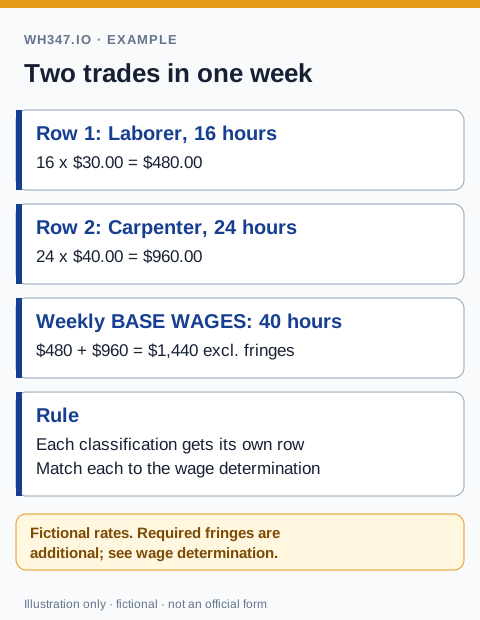
The rule is straightforward: a worker performing work in two or more classifications in the same week gets a separate line on the WH-347 for each classification. Each line shows the hours worked in that classification, the applicable prevailing wage rate, and the corresponding gross wages for those hours. The total deductions are typically shown on one of the lines (or split proportionally), but the classification-specific hours and rates must be reported separately.
- Use a separate row for each work classification performed during the week.
- Apply the prevailing wage rate that corresponds to the actual work performed — not the worker's job title.
- Track hours by classification daily, not just weekly totals. This matters because the prevailing wage rate varies, and overtime calculations depend on having the right hours at the right rate.
- Deductions are calculated on total gross wages for the week — you don't need to split deductions by classification, but the gross wages and hours must be separated.
Tracking Hours by Classification Throughout the Week
For a worker registered as an apprentice, also review the apprentice registration, ratio and progression requirements; a trade change does not by itself establish eligibility for a reduced wage.
The DOL instructions for Columns 1A and 3 explain separate classification rows and the highest-rate rule when an accurate breakdown was not kept. Review how project wage determinations apply and the current WH-347 column guide before transferring your time records.
Accurate multi-classification reporting requires accurate time tracking during the week — not reconstruction on Friday afternoon. If a worker switches from Laborer to Carpenter work mid-day, the supervisor needs to log that switch. A simple daily time sheet that records start time, classification at the start of each task, and stop time is sufficient documentation for payroll and audit purposes.
When reconstructing hours from memory at the end of the week, errors creep in — and those errors get baked into a legal compliance document. Building the documentation habit is worth the small overhead.
Multiple Wage Determinations on One Project
Some projects incorporate multiple wage determinations — for example, a project that spans two counties, or one that involves both building construction and heavy construction work. When this happens, the applicable wage determination for any given worker depends on both their classification and the specific work location or type covered by each determination.
The contracting agency will typically specify which wage determination applies to which scope of work in the contract documents. Read those specifications carefully at project kick-off, not after the first payroll is submitted. If the contract is unclear about which rates apply, ask the contracting officer in writing before work begins — correcting five weeks of misclassified payrolls is a significant administrative burden.
- Building + heavy construction: common on mixed-scope projects (e.g., a building with significant sitework). Each type of work triggers its own wage determination.
- Multi-county projects: if work crosses county lines and the prevailing wage rates differ by county, workers may need separate WH-347 entries for work performed in each jurisdiction.
- Highway projects: federal-aid highway projects often distinguish between on-highway and off-highway construction work, each with different classifications and rates.
When Crew Composition Changes Week to Week
It's normal for the crew on a federal project to change over time — new workers join, others rotate off, and the mix of trades shifts as the project progresses from sitework to structure to finish. Each worker who performs any work on the project in a given week must appear on that week's WH-347, regardless of whether they appeared on the previous week's report.
When a new worker joins mid-project, make sure their information is entered correctly in your system before their first week on the WH-347. Check the following before adding them to a payroll submission:
- Correct work classification for the work they will perform on this project.
- Applicable prevailing wage rate for that classification under the project's wage determination.
- Fringe benefit elections — whether their fringe is paid through a plan or as additional cash wages.
- Apprenticeship status and documentation, if applicable.
- Correct SSN (last four digits) — transpositions are one of the most common WH-347 errors.
Best Practices for Complex Crew Situations
Multi-trade reporting is manageable when the right systems are in place. The biggest risk is using informal processes — mental tracking of who did what, spreadsheet workarounds, or retrofitting a general payroll report — to handle a specialized compliance workflow. The WH-347 is a legal document and its accuracy is your personal legal exposure.
- Use a timekeeping system that captures classification at the task level, not just total hours per day.
- Set up each employee's classification(s) in your payroll or certified payroll system before the project starts, not after the first payroll run.
- Review the weekly WH-347 before signing — confirm that every row's classification, hours, and rate make sense for what actually happened on site that week.
- Keep the supervisor's daily crew log as a backup for any hours-by-classification question that comes up in an audit.
WH347.io supports multi-classification timecards directly: a single worker can have multiple timecard lines in a given week, each with a different classification and rate. The WH-347 output automatically formats those lines correctly, including the classification labels and per-classification gross wage calculations.
Frequently Asked Questions
How do I report a worker who performs two different trades on the WH-347?
Use a separate line on the WH-347 for each work classification the worker performed during the week. Each line shows the hours worked in that classification and the applicable prevailing wage rate. Total deductions are based on total gross wages for the week, but hours and rates must be reported by classification.
What if my project has two different wage determinations?
Apply the wage determination that corresponds to the specific type of work and location covered by each determination. Your contract documents should specify which determination applies to which scope of work. If it is unclear, request written clarification from the contracting officer before work begins.
Does a worker who joins the project mid-week still go on the WH-347 for that week?
Yes. Any worker who performs work on the federal project during a given week must appear on that week's WH-347, even if they only worked one day. There is no minimum hour threshold for inclusion.
How do I track hours when a worker switches classifications during the day?
The supervisor should log the switch at the time it occurs, recording start time, classification, and stop time for each task. End-of-week reconstruction from memory introduces errors into a legal compliance document. A simple daily time sheet that captures classification at the task level is sufficient.
Can a worker appear on two different wage determinations in the same week?
Yes, if the project covers multiple geographic areas or work types with separate wage determinations, and the worker performed work in both areas. Each determination's applicable hours and rates are reported on separate lines on the WH-347.