Paystub Import for Certified Payroll
— WH347.io Team
If your workers are on ADP, Gusto, QuickBooks, or any other payroll system, that data already exists on a paystub. WH347.io can read the paystub and pre-fill your timecard automatically — here's how it works.
Every certified payroll week means re-entering data you already have. Hours, gross wages, FICA, federal and state withholding — all of it is sitting on a paystub from your payroll processor. WH347.io can read that paystub directly and fill in your timecard automatically, cutting most of the manual entry out of the process entirely.
What Is Paystub Import?
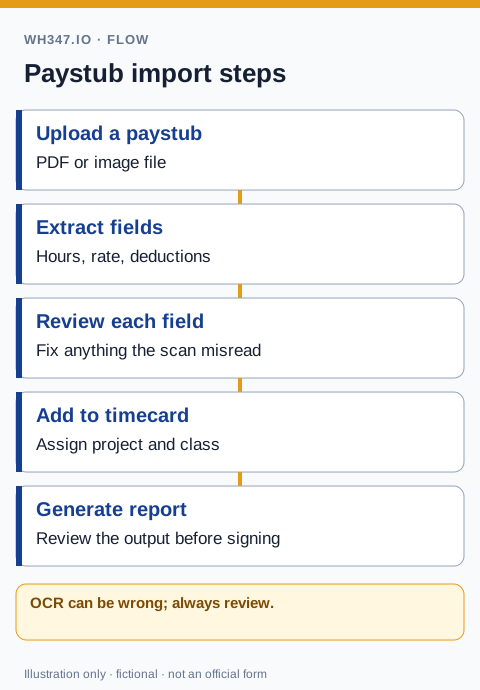
Paystub import uses optical character recognition (OCR) to extract payroll data from an uploaded image or PDF. You upload a scan or photo of a worker's paystub, and the system reads what it finds — then pre-fills the timecard form with gross wages, hours, and deductions. You review the results, correct anything that needs correcting, and save. That's it.
What Data Gets Extracted?
Depending on the paystub layout, the import can pull out:
- Straight-time and overtime hours worked
- Hourly base rate
- Gross pay for the pay period
- Federal income tax withheld
- Social Security and Medicare (FICA) deductions
- State income tax withheld
- Other deductions (with label, if shown on the paystub)
Fields the OCR can't confidently read are left blank so you can fill them in manually — the system won't guess on numbers that go into a legal compliance document.
How to Use It: Step by Step
- Open the Timecards page and click Add Timecard.
- Select the employee and project.
- Click Import from Paystub.
- Upload a JPG, PNG, or PDF of the paystub.
- Review the pre-filled fields — correct anything that looks off.
- Save the timecard. Done.
The review step is built into the flow and is not optional — which is by design. You sign the Statement of Compliance, not the software, so the final check is always yours.
Supported Paystub Formats
Paystubs vary enormously by payroll provider. The import works with:
- Digital PDFs exported directly from ADP, Gusto, QuickBooks Payroll, or other payroll platforms — these give the best results because the text is machine-readable.
- Smartphone photos of printed paystubs — acceptable quality for most phones taken in good lighting.
- Scanned documents at 200 DPI or higher.
Blurry photos, low-resolution scans, or paystubs with dark backgrounds will extract less accurately. When in doubt, use the digital PDF from your payroll software.
How Much Time Does It Actually Save?
Manually entering a timecard for one worker — including hours, rates, and all deduction fields — takes roughly three to five minutes if you have the paystub in front of you. For a crew of eight on a weekly submission cycle, that's 24 to 40 minutes of data entry every single week. Over a six-month federal project, you're looking at 12 to 20 hours of pure transcription work that the import feature eliminates.
With paystub import, the upload-and-review step runs about one to two minutes per worker. The time savings compound quickly on projects with consistent payroll — same crew, same pay period structure, week after week.
Who Benefits Most from Paystub Import?
The feature is especially useful for subcontractors who run payroll through a third-party provider. Your payroll processor handles the actual paycheck — you receive the paystubs, upload them, and your certified payroll is done without double-entering anything. There's no need to give your payroll provider access to WH347.io or change any part of how you run payroll.
It also helps general contractors who manage workers across multiple projects. Each paystub gets assigned to the correct project during the import flow, so weekly payrolls stay organized even when the same worker moves between jobs.
From Import to WH-347 in One More Click
Once a timecard is saved — whether it was imported or entered manually — generating the WH-347 is one click from the Reports page. WH347.io fills the form automatically from the stored timecard data: hours, classifications, gross wages, deductions, and the Statement of Compliance. The resulting PDF is ready to submit to the contracting agency or upload to a DOT portal.
The reviewed timecard data can also be used for California eCPR or AASHTOWare-targeted XML exports. Confirm the receiving agency's required format, schema, identifiers, and certification process; an available export does not prove acceptance.
Always Review Before Submitting
A paystub alone may not show daily project hours or trade changes. Reconcile imported values with the DOL's required payroll fields, using our QuickBooks paystub workflow and multi-classification timekeeping guide when a worker moves between jobs or trades.
OCR is accurate but not perfect — unusual fonts, two-column layouts, or paystubs with condensed formatting can cause occasional misreads. The import flow is designed to surface every extracted value for your review before anything is saved. Treat the pre-filled timecard the same way you'd treat an auto-filled PDF: read it before you sign off on it.
Frequently Asked Questions
What file formats does paystub import support?
WH347.io accepts JPEG, PNG, and PDF files. Digital PDFs from payroll providers like ADP, Gusto, or QuickBooks give the most accurate results. Clear smartphone photos of printed paystubs also work well.
What happens if the OCR misreads a number?
Every extracted field is shown to you for review before the timecard is saved. Fields the system couldn't read confidently are left blank. You can correct any value before confirming — nothing is saved without your review.
Does paystub import work with ADP, Gusto, or QuickBooks paystubs?
Yes. The feature works with any paystub format. Results are best with digital PDFs since they contain machine-readable text, but clear photos of printed paystubs from any provider also work.
Is paystub import available on all plans?
Paystub import is a Pro plan feature. It's available on all active Pro subscriptions with no per-import limit.
Do I need to give my payroll provider access to WH347.io?
No. You simply download or photograph the paystub your payroll provider generates and upload it to WH347.io. No integration with your payroll system is required.