Why Spreadsheets Fail for Certified Payroll
— WH347.io Team
Spreadsheets seem like a natural fit for tracking payroll — until a DOL audit reveals a data-entry error from three months ago. Here's why purpose-built software makes more sense for certified payroll.
When contractors first start working on federal projects, the spreadsheet approach seems perfectly reasonable. You have Excel or Google Sheets, a downloaded copy of the WH-347 PDF, and a process that works — at least for the first few weeks.
But as employee counts grow, projects multiply, and audit pressure increases, the cracks in that system become hard to ignore. Here's why spreadsheets consistently fail for certified payroll management — and what a better approach looks like.
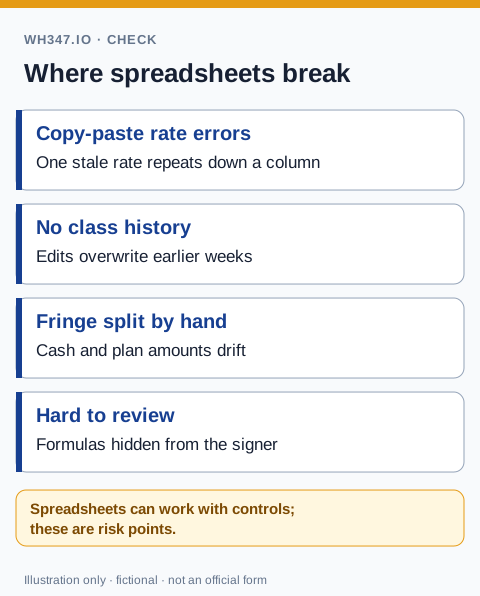
The Human Error Problem
Certified payroll is detail-intensive work. A single worker's weekly entry touches their name, ID, classification, seven days of hours, straight-time rate, overtime rate, gross pay, three or more deductions, and net pay. Multiply that by 15 workers across two projects and you have hundreds of individual data points per week — all entered manually.
Research consistently shows that large spreadsheets contain errors in roughly 1 in 5 cells. In certified payroll, those errors don't just cause accounting headaches — they become compliance violations that can trigger back-wage claims or DOL scrutiny.
The Version Control Problem
Projects span months or years. Spreadsheets get emailed, saved locally, and modified by multiple people. By Week 12 of a project, you may have three different 'final' versions of your payroll file with no clear audit trail showing which one was actually submitted. During a DOL audit, that ambiguity is not your friend.
The Classification Problem
Every worker on a Davis-Bacon project must be assigned the correct labor classification — and that classification must match the applicable wage determination. Misclassifying a worker, even accidentally, is a compliance violation. Spreadsheets have no built-in mechanism to validate classifications against wage determinations or flag when a worker's pay falls below the required prevailing wage rate.
The Fringe Benefit Calculation Problem
If you still prepare reports in a workbook, use the Excel template review checklist to compare its fields with the current form and review its formulas before filing.
The DOL payroll instructions require hours for the work actually performed and separate fringe reporting. Review the hours-by-classification workflow before deciding which workbook checks your team needs.
Fringe benefits under Davis-Bacon can be satisfied through health insurance, pension contributions, vacation pay, or equivalent cash payments. The math for correctly allocating fringe credit — especially when a worker has partial benefits — is exactly the kind of nuanced calculation that's easy to get wrong in a custom spreadsheet formula.
What Purpose-Built Certified Payroll Software Does Differently
- Stores employee records, classifications, and wage rates centrally — no re-entry week after week.
- Generates the WH-347 PDF automatically from timecard data, eliminating the manual transfer step.
- Enforces prevailing wage minimums and flags underpayments before the report is submitted.
- Maintains a complete, timestamped payroll history for every project — exactly what auditors want to see.
- Handles fringe benefit calculations correctly, including cash-in-lieu scenarios.
- Supports CSV import for contractors already using accounting software like QuickBooks.
The Bottom Line
The cost of a certified payroll software subscription is a fraction of the cost of a single DOL audit finding. For contractors serious about federal work, switching from spreadsheets — or working around QuickBooks certified payroll limitations — to a purpose-built tool like WH347.io isn't just a convenience, it's a risk management decision. The time savings alone typically pay for the subscription within the first month.
If you are deciding between a workbook and a blank form, compare the WH-347 fillable PDF and online workflow before choosing a process. The real operational test is not whether a spreadsheet can calculate this week's totals; it is whether your team can reproduce, review, and defend every submission months later.
Frequently Asked Questions
Why do spreadsheets fail for certified payroll?
Spreadsheets require manual entry of hundreds of data points per week across workers and projects, which leads to transcription errors, version control problems, and no validation against prevailing wage rates. Research shows large spreadsheets contain errors in roughly 1 in 5 cells — and in certified payroll, those errors become compliance violations.
What are the biggest risks of using spreadsheets for certified payroll?
The main risks are data-entry errors that create wage underpayment violations, version control problems that leave no clear audit trail, misclassification of workers because spreadsheets can't validate against wage determinations, and incorrect fringe benefit calculations. Any of these can result in back-wage orders, withheld payments, or a DOL audit finding.
Can I use Excel to fill out the WH-347 form?
You can manually enter data into an Excel-based WH-347 template, but it doesn't validate wage rates, enforce prevailing wage minimums, or generate the required PDF format automatically. For one or two workers it may be manageable, but for larger crews across multiple projects, error risk and time cost make it impractical.
What does certified payroll software do that a spreadsheet can't?
Purpose-built certified payroll software stores employee records and wage classifications centrally, enforces prevailing wage minimums, automatically generates the WH-347 PDF from timecard data, maintains a timestamped audit trail for every project, and handles fringe benefit calculations — including cash-in-lieu scenarios — without manual formulas.